
Products and competitor links
Check the pages from your own store
BlackAha can list the product pages on your own store. This shows you at a glance which of your products you already watch and which ones you have missed, so your price comparison covers your whole range.
Before you start
- Your store’s web address saved as the business domain. See Set up your workspace.
- At least one product already added.
Open the list
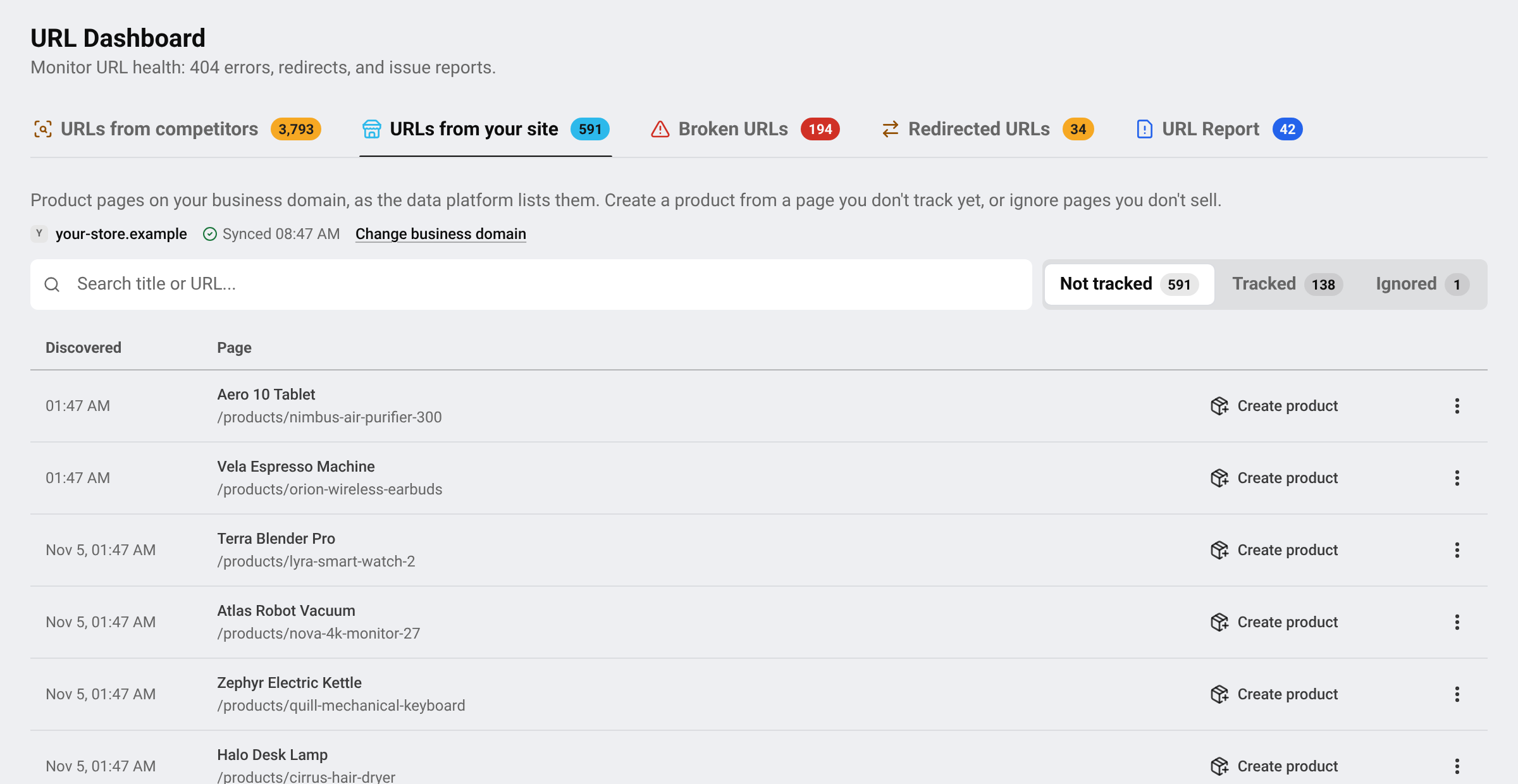
Go to URL DashboardURLs from your site. Your business domain is shown at the top, with the time of the last update. The list is split into three tabs:
- Not tracked: pages on your store that are not linked to any product yet.
- Tracked: pages already linked to a product.
- Ignored: pages you chose to ignore.
Turn a page into a product
Pick a page
In Not tracked, search by title or address and find a product you want to watch.
Create the product
Press Create product. The product form opens with your page already linked. Fill in the name and code and press Create.
Add competitors
Add the same product’s pages on other stores so you have something to compare with. See Find new competitor pages automatically.
Pages you do not sell or do not care about (gift cards, bundles, old items…) can be moved out of the way with Ignore.
If the list is empty or still loading
- Syncing the product pages of your business domain — this can take up to an hour.
- The data platform has not indexed this domain yet. A new domain usually appears within 1–3 days.
- The product pages of your business domain become available after you add your first product.
- The last sync failed. It retries automatically.
Tip Wrong store shown at the top? Press Change business domain. The number of changes is limited, so check the address carefully.
Questions
Why should my own pages be tracked?
Your own price is the reference. With your page linked, BlackAha can show if you are cheaper or more expensive than each competitor.
Does ignoring a page change my store?
No. It only hides the page from this list. You can bring it back from the Ignored tab.
Is this list included in my plan?
It depends on the plan. If a lock appears, see the pricing page.
Related guides
Still stuck?
Open Support in the app and our team will reply there. You can also email our support team; the address is at the bottom of every page.
 English
 ไทย
 Tiếng Việt
 한국어
 日本語
 简体中文
 Français
 Deutsch
 Русский
 Italiano
 Polski
 Español