
Price tracking and history
Understand stock status
Each time BlackAha checks a store page, it also reads whether the product can be bought. A competitor that is sold out cannot win a customer on price, so stock matters as much as the price itself.
Before you start
- Products with links. See Add a product by hand.
What the marks mean
In the Stock column of the product list, and next to Stock status on the product page:
- A green tick: In stock.
- A red cross: Out of stock.
- A pale tick: the store gave another status, such as pre-order or backorder, or did not say. Point at the mark to see the exact status.
Stores word this in many ways (sold out, unavailable…). BlackAha turns them into one set of statuses: In Stock, Out of Stock, Preorder, Backorder and Discontinued.
How stock changes the comparison
Competitors that are out of stock or have stopped selling the product are left out of the market range, the market average and the price index. Pre-order and backorder still count. So your comparison reflects only the stores a customer can actually buy from today.
Tip When a competitor runs out, the market range can jump. Before you change your price, open the product page and check which stores are still in stock. See Read a product’s prices and history.
Filter by stock
On a product page, use the stock filter and pick In stock or Out of stock to see only those links.
Stock on the dashboard
The Stock and availability card on the Dashboard compares Your availability with Market availability, and shows how many links recently went out of stock or came back.
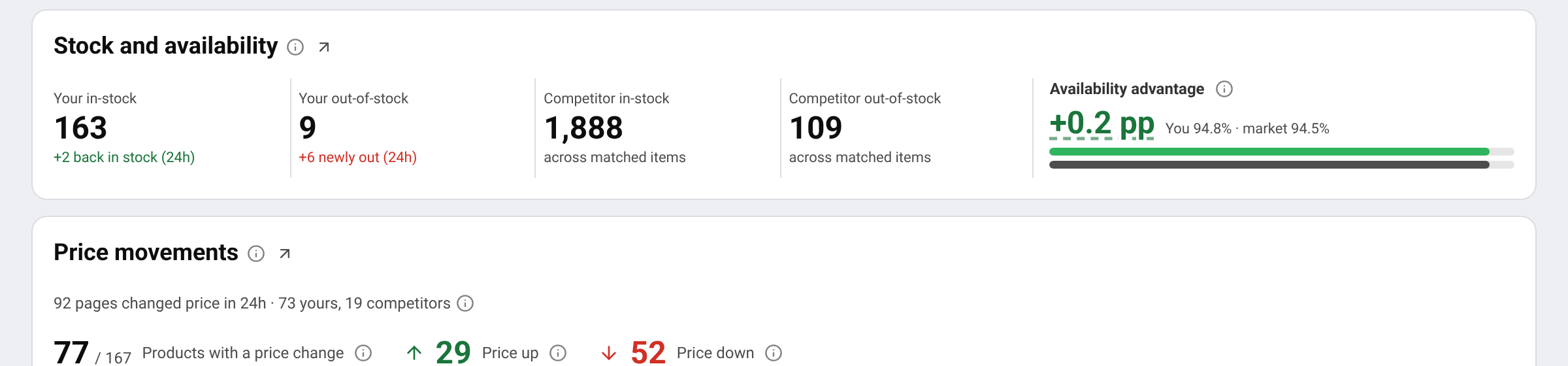
Availability advantage: How often your products are in stock compared with the business domains you track, on the same products. Above zero means you can supply what they cannot; below zero means they can. It is measured in pp (percentage points): in stock on 68% of the items against the market’s 62% is +6 pp.
Get told when stock changes
Stock changes use the same alert as price changes: Price & stock changes. Turn it on in SettingsNotification and choose where to receive it. See Get price change notifications.
Questions
A store shows in stock, but its website says sold out. Why?
The status is read on each check, so it can lag behind the store for a while. If it stays wrong, report the link, see Report a wrong price or a link problem.
Does an out-of-stock link keep its price?
Yes. The last price stays in the history. It is only left out of the market figures until the product is back in stock.
Related guides
Still stuck?
Open Support in the app and our team will reply there. You can also email our support team; the address is at the bottom of every page.
 English
 ไทย
 Tiếng Việt
 한국어
 日本語
 简体中文
 Français
 Deutsch
 Русский
 Italiano
 Polski
 Español