
Smart Price and automatic pricing
Use Smart Price suggestions
Smart Price looks at the competitor prices you track and suggests three prices for each product: one to win on price, one in line with the market, and one to keep a higher margin. You stay in charge: the suggestions never change your store on their own.
Before you start
- A product with links to several competitor stores that show a price. See Add a product by hand.
- For the gap against your own price: your store’s page linked to the product, and your business domain set.
Where to find it
Every product in Products has a SmartPrice box, and so does the product page. It shows the three suggested prices, when they were last calculated, and a Confidence score.
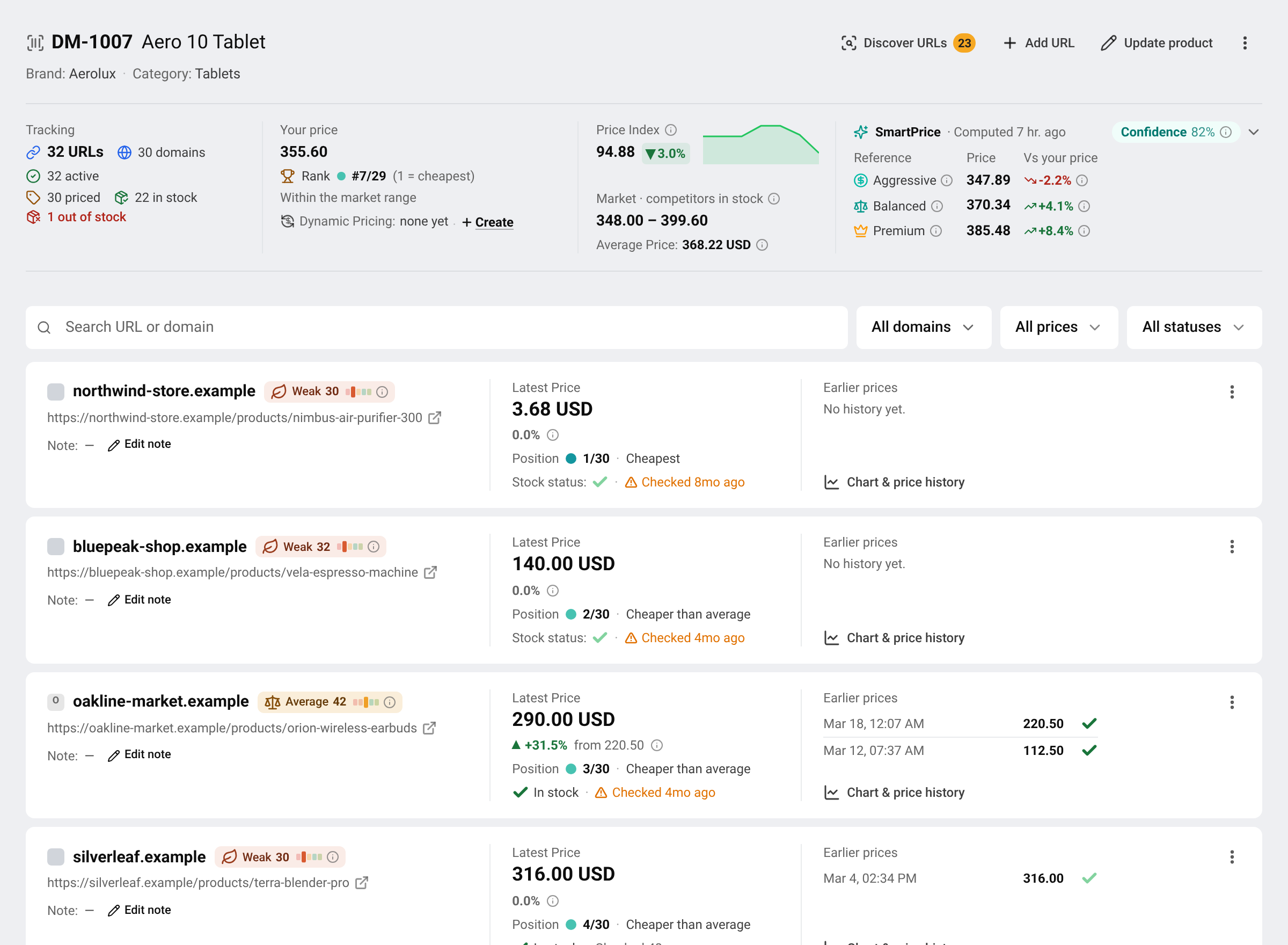
Click the box to open the details.
The three suggestions
- Aggressive: Price below market to maximize sales volume and gain market share. Use when launching a new product, clearing excess stock, or when your product needs to build buyer reviews and ranking. Accepts lower margin in exchange for velocity.
- Balanced: The recommended default — optimal balance between margin and competitiveness. Tracks market median to stay competitive without sacrificing profitability. Suitable for most products in most situations.
- Premium: Price above market average to maximize margin per unit. Use when your product has strong brand positioning, low competitor supply, or you serve a price-insensitive segment. Best when your business domain has loyal repeat buyers.
When your own price is known, each suggestion also shows how far it is from your current price.
How much to trust a suggestion
The Confidence score, from 0 to 100%, says how reliable the suggestion is. When it is low: Insufficient competitor data. Track more URLs to improve accuracy.
Click the SmartPrice box to open Market Signals: the market data behind the suggestion.
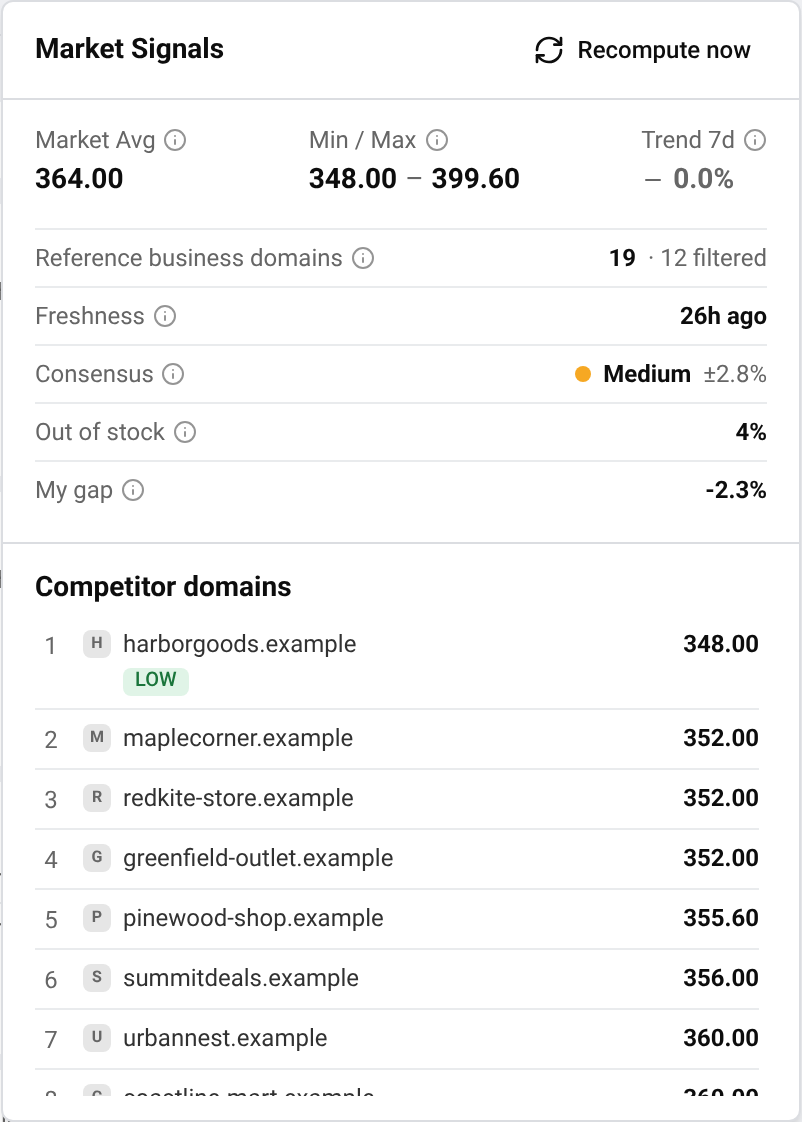
- Market Avg: Market fair price — weighted average of reference business domains, with outliers and your own business domain excluded.
- Min / Max: Lowest and highest price among the business domains counted toward the price anchor.
- Trend 7d: 7-day price trend — median price change across reference business domains; negative means the market is falling.
- Reference business domains: How many business domains actually count toward the price anchor, plus how many data points were filtered out as unreliable.
- Freshness: How long ago the most recent price data was collected.
- Consensus: How closely business domains price to each other — high consensus means a more trustworthy anchor.
- Out of stock: Share of reference business domains currently out of stock — scarcity usually allows a higher price.
- My gap: Difference between your price and the market fair price.
Under Competitor domains, each competitor is listed from the lowest price up. LOW marks the cheapest, and OOS a store that is out of stock.
Some links are left out of the calculation, each with a reason. For example:
- Outlier: The price is far too high or too low compared to everyone else and is not a real selling price, so it is left out of the suggestion
- Out of stock: This business domain is out of stock, so it is not counted in the suggestion
- Stale: The price here has not changed in a long time and no longer reflects the current market
- Currency: This page sells in a different currency, so it cannot be compared with your price
- Your business domain: Your own business domain is left out of the market price so what you charge does not influence the suggestion
Update a suggestion
Suggestions are recalculated automatically when competitor prices change. To update one right away, open the details and press Recompute now. Computing on platform — this can take up to 30 seconds…
If the details show Cooldown, your own price changed recently. BlackAha waits a little before recalculating, so that your new price does not immediately pull the market reference with it.
When there is no suggestion
- Waiting for first calculation: The recommended price will appear after the first run.
- No competitor URL yet: Add a competitor URL so there is something to compare against.
- Not enough market data: Add more URLs, or wait for more prices to be collected.
- Could not calculate this time: It will be retried automatically.
Put a suggestion to work
In Products, use the Aggressive, Balanced and Premium filter to find products where your price is higher or lower than a suggestion.
To change prices in your store automatically, use a suggestion inside a pricing rule, for example “set the price to Smart Price: Balanced”. See Create a pricing rule.
Questions
Does Smart Price change my store’s prices?
No. It only suggests. Prices change in your store only through a pricing rule and a connected store.
Is my own price part of the market price?
No. Your store is left out, so your own price does not influence the suggestion.
Related guides
Still stuck?
Open Support in the app and our team will reply there. You can also email our support team; the address is at the bottom of every page.
 English
 ไทย
 Tiếng Việt
 한국어
 日本語
 简体中文
 Français
 Deutsch
 Русский
 Italiano
 Polski
 Español