
Price tracking and history
See every price change in one list
The product page shows one product at a time. The Price history page shows every price change on every link you track, newest first. Use it to see what moved in the market today, or to follow one competitor across all your products.
Before you start
- Products with links that already have prices. See Add a product by hand.
Read the list
Open Price history in the left menu. Each row is one recorded price on one store page, compared with the price recorded before it:
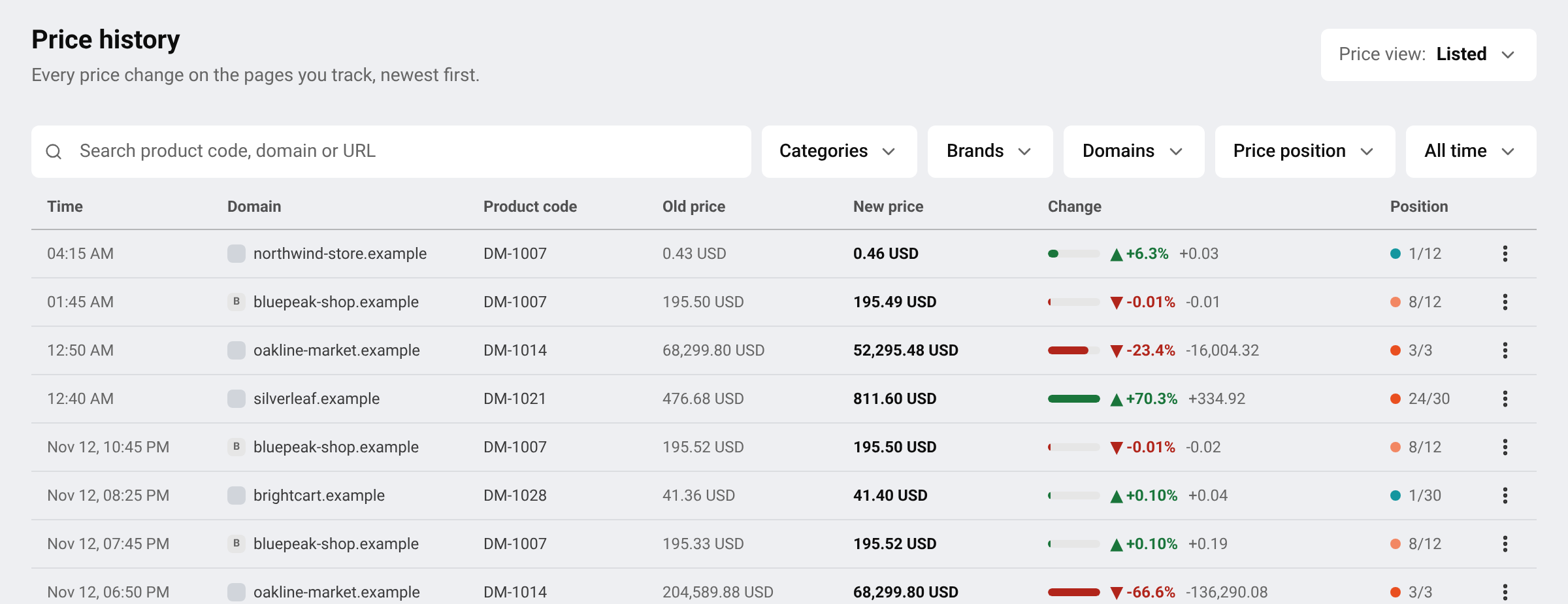
- Product code and Domain: which product, on which store.
- Old → new price and Change: the price before and after, and by how much it moved.
- Position: where this store’s price now ranks among all sellers of the product. 1 is the cheapest.
- Time: when the change was found.
A price point is recorded whenever price, currency or stock status changes, and at least once every 7 days. That is why you can also see rows where the price stayed the same.
Find what matters to you
- Search by product code, store or page address.
- Press Filters to narrow the list by Categories, Brands, Domains or Price position. You can pick several values in each.
- Active filters are listed above the table. Remove one by one, or press Clear all.
Tip Filter on one store under Domains to see every move that competitor made, across all your products.
Act on a change
Open the menu at the end of a row:
- Open URL: opens the store’s page in a new tab, so you can check the price yourself.
- View history: opens the chart and full history of that link. See Read a product’s prices and history.
- Report issue: tells our team the price looks wrong. See Report a wrong price or a link problem.
Questions
Why is a product missing from the list?
A link appears once its first price has been recorded. Links still waiting for a price are not listed, see Prices are not showing yet. Also check that no filter is active.
Can I be told about changes instead of checking this list?
Yes. See Get price change notifications.
Related guides
Still stuck?
Open Support in the app and our team will reply there. You can also email our support team; the address is at the bottom of every page.
 English
 ไทย
 Tiếng Việt
 한국어
 日本語
 简体中文
 Français
 Deutsch
 Русский
 Italiano
 Polski
 Español