
Dashboard and reports
Understand your price index and price position
Two ideas come back on almost every BlackAha page. The price index tells you how much cheaper or more expensive you are than the market. The price position tells you where you rank among the stores that sell the same product. Together they answer “am I priced right?”
Before you start
- Your store’s web address saved as the business domain. See Set up your workspace.
- Your own product page linked to each product, next to competitor links. See Add a product by hand.
The price index
The price index compares your price with the market average, the average price of the same product on the competitor pages you track. It is worked out as Your price ÷ market avg × 100.
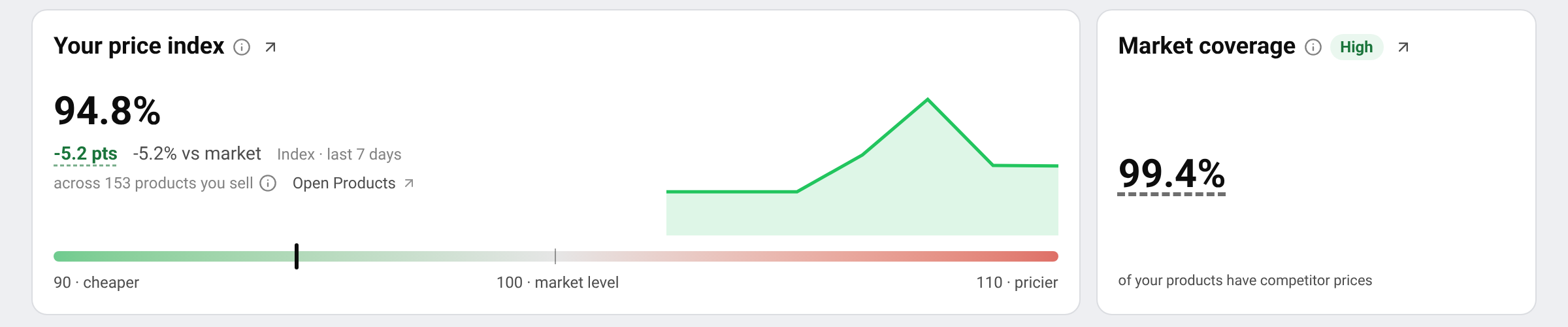
- 100 means your price equals the market average.
- Below 100 means you are cheaper. 95 means 5% below the market.
- Above 100 means you are more expensive. 110 means 10% above the market.
On a product page, Price Index shows the index for that one product. On the dashboard and in reports, the index is averaged over all the products you sell that have at least one competitor price.
Tip The market average only counts competitor pages that are active, in stock, priced, and in a currency that can be converted. Hover over the average on a product page to see which pages were included and why others were left out.
The price position
For each product, BlackAha sorts every store’s price from cheapest to most expensive and puts your price into one of five groups:
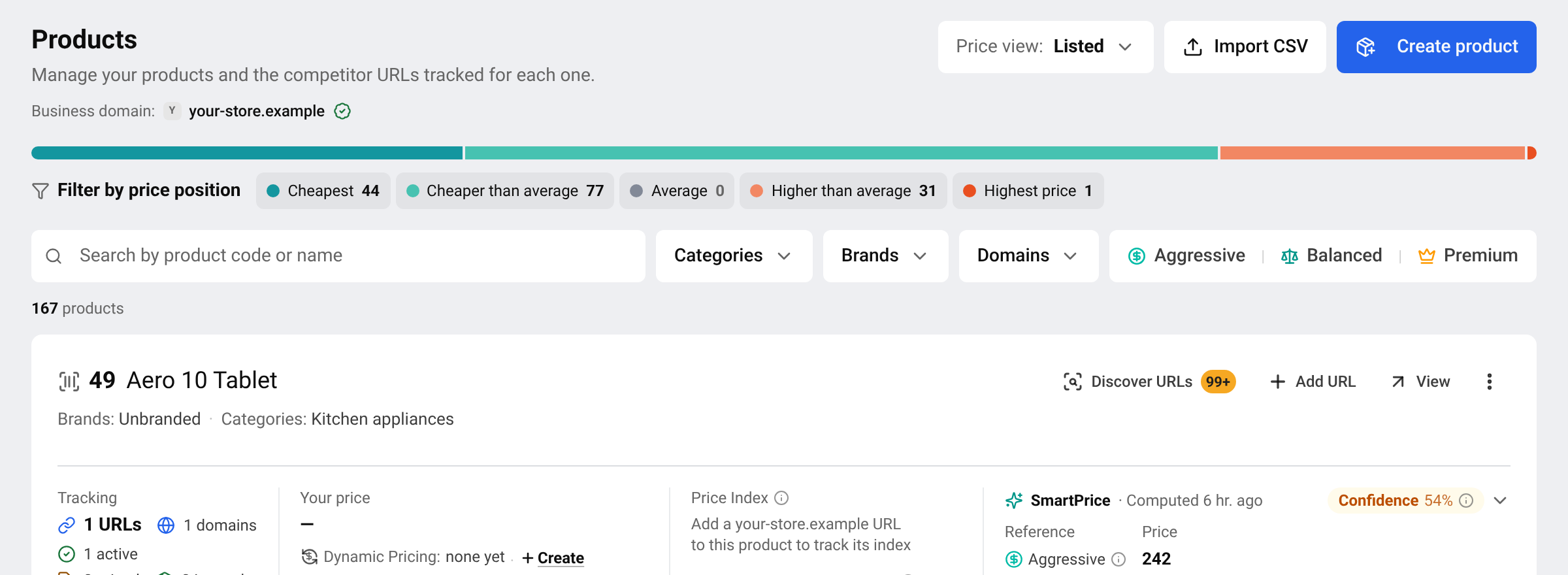
- Cheapest: nobody is cheaper than you. Stores with the same price share this place.
- Cheaper than average: someone is cheaper, but you are below the average.
- Average: you are right on the average, or every store has the same price.
- Higher than average: you are above the average, but someone is more expensive.
- Highest price: every other store is cheaper than you.
On Products, the coloured bar and the Filter by price position buttons count your products in each group. Click a group to list only those products. Your Rank on a product counts from the cheapest: 1 = cheapest.
Index or position: which one to read
The position answers “am I the cheapest?”. The index answers “by how much?”. You can be in Highest price by a few cents, with an index close to 100, or be the cheapest by a wide margin. Read both before you change a price.
Market coverage
Market coverage is the share of your products that have at least one competitor price. Low coverage means many of your products have nothing to compare with yet, so the index rests on a small part of your range. Add competitor links to raise it. See Find new competitor pages automatically.
Why the index is missing
- Set business domain to see Price Index
- The product has no link from your own store. Add your page to the product.
- No competitor page has a usable price yet. See Prices are not showing yet.
Questions
Is a low index always good?
Not always. It means you are cheaper than the market, which can also mean you are giving away margin. Use it together with your own pricing goals.
Prices are in different currencies. Can they be compared?
Yes. Prices are converted to your workspace currency for the index and reports. See Change your store address and currency.
Why did my index change when I did not change a price?
Because competitors changed theirs. If the market goes up and you stay still, your index goes down.
Related guides
Still stuck?
Open Support in the app and our team will reply there. You can also email our support team; the address is at the bottom of every page.
 English
 ไทย
 Tiếng Việt
 한국어
 日本語
 简体中文
 Français
 Deutsch
 Русский
 Italiano
 Polski
 Español